System Design From Scratch — Floor 3: How Data Survives a Crash
Fourth post in the series. We can move data reliably between machines (Floor 2). Now: once data arrives, how do you store it so it survives a crash, a power cut, a reboot? This is where the word durability finally gets a precise, physical meaning.

The premise
You've been typing a document for an hour. You never hit save. The power cuts out. You reboot, reopen the file, and your hour is gone — but whatever you'd saved earlier is still there.
Everyone has lived this. The question is why: what's physically different about "saved" data versus "unsaved" data?
Volatile vs persistent
The unsaved work was sitting in RAM; the saved work had been written to disk. And those two are different in a way we ignored back on Floor 0 (where we only cared about speed):
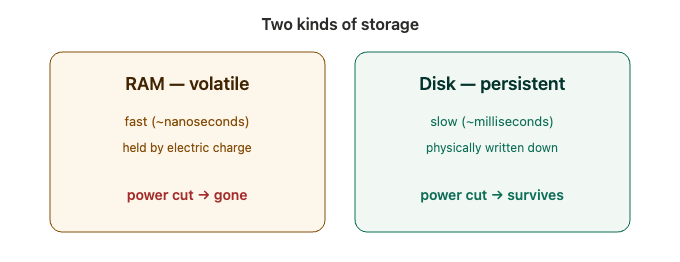
- RAM is volatile. It holds each bit as a tiny electric charge that needs constant power. Cut the power and it all drains away. Fast, but forgetful.
- Disk is persistent (non-volatile). It physically writes the bit down (magnetic spots, or trapped charge in flash) — it stays put with the power off. Slower, but it remembers.
So durability finally has a precise meaning: once written, data survives a crash or power loss. You get it by putting data on persistent storage. "Saving" is just copying from the fast-but-forgetful place to the slow-but-permanent place. And notice the tension — it's the same one that runs through this whole series: fast (RAM) vs. safe (disk).
The catch: "done" is a lie
Here's the crack. Disk is slow (Floor 0's "1 day" shelf), yet hitting save feels instant. Something's off. If truly writing every byte to the slow disk took real time, saving would feel slow every time. It doesn't. So where did the data actually go?
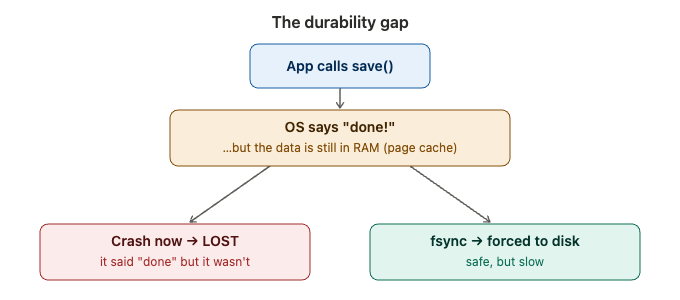
The OS acknowledges "done!" while the bytes are still in a RAM buffer (the page cache), and writes them to the physical disk lazily, later. So there's a window where it told you it saved, but the data is still in volatile memory. Crash in that window → it's gone. Your durability was a lie.
(Notice this is the exact same trap as a message broker acking before it replicates, or TCP acking a stream — acking before it's truly durable. Same pattern, third floor.)
The tool that closes the gap: fsync — "don't tell me done until the bytes are physically on the disk." It forces the buffer out to the platter. So the honest trade-off is, again, fast vs. safe:
- Buffer + lazy write: fast, but a crash loses recent "saved" data.
fsyncevery write: truly durable, but slow — you pay full disk latency each time.
The clever fix: the write-ahead log
A database doing thousands of writes/second can't lose data, but it also can't fsync its whole giant data file on every write — hopelessly slow. So it does something clever:
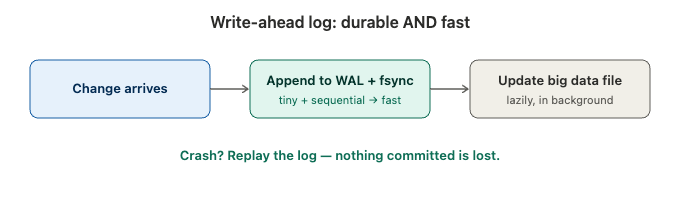
Before touching the big data structure, it appends the change to a small log file and fsyncs just that — the write-ahead log (WAL). Why is that fast? The record is tiny and it's a sequential append to one file — the disk lays it down in a single stroke, no jumping around to random spots in a huge file. Small + sequential = a cheap fsync.
Once the log entry is durable, you can safely say "committed" — it's safe now, even though the big structure hasn't caught up. You update that lazily in the background. And crash recovery is beautiful: on restart, you replay the log and re-apply anything that hadn't landed yet. Nothing committed is ever lost. That's how a database delivers the "D" (durability) in ACID.
One honest nuance: the WAL makes durability cheap, not free — you still choose how often to fsync the log. Every transaction = safest but slower; batch a few per fsync (group commit) = faster, but a crash could lose the last few milliseconds. The tension shrinks and becomes tunable; it never fully disappears.
What you now own
- volatile (RAM) vs persistent (disk); durability = survives a crash/power loss
- the hidden gap: systems ack "saved" while data is still in the RAM page cache → a crash loses it
fsync— force bytes to the platter; safe but slow- the write-ahead log — append +
fsynca tiny sequential log first, update the big structure lazily, replay to recover → durable and fast - the tunable knob: group commit
Next: Floor 4
We can now store data durably on one machine. But one machine is a single point of failure, and it has a capacity ceiling. Floor 4 goes wide: replication, partitioning, and the CAP theorem — using more than one machine, and the new problems that creates.
See you on Floor 4.
 Neeraj Dana